
System Health and Backup Evidence
An authorized owner can open System Health from the account menu.
Last updated: 16 November 2026 · Product version: not specified in the supplied guide
Check the scheduler heartbeat
An authorized owner can open System Health from the account menu. The scheduler heartbeat is expected every five minutes and becomes stale after ten minutes. Not Observed means no scheduled heartbeat has been saved. A recent signal proves this heartbeat command ran; it does not prove that every scheduled task or queue worker succeeded. Ask your hosting administrator to configure the displayed schedule command.
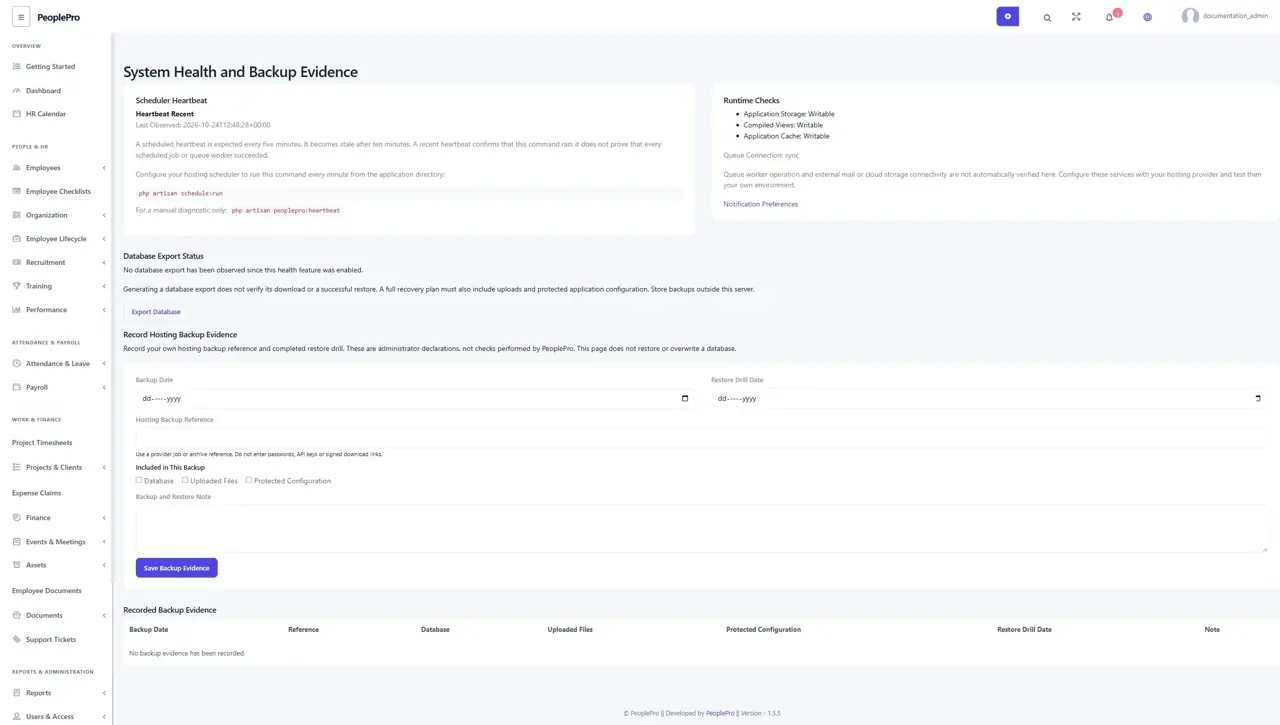
Review runtime and database export status
Runtime Checks show whether application storage, compiled views and application cache are writable, together with the configured queue connection. Database Export Status records a generated export and checksum after the normal export workflow succeeds. Generation does not prove that someone downloaded or successfully restored it. Real mail, cloud storage and queue-worker operation require testing in your own hosting environment.
Record a hosting backup and restore drill
After your hosting backup process runs, record its date, safe provider/archive reference, included components and explanation. Add the restore-drill date only after a real restore test. These are administrator declarations; PeoplePro does not perform or verify the provider backup/restore from this form. Keep copies outside the same server and include uploads and protected configuration as well as the database. Do not enter passwords or signed download links.