
HR Analytics and Employee Drill-down
Open Reports > HR Analytics.
Last updated: 16 November 2026 · Product version: not specified in the supplied guide
Review movement for one company
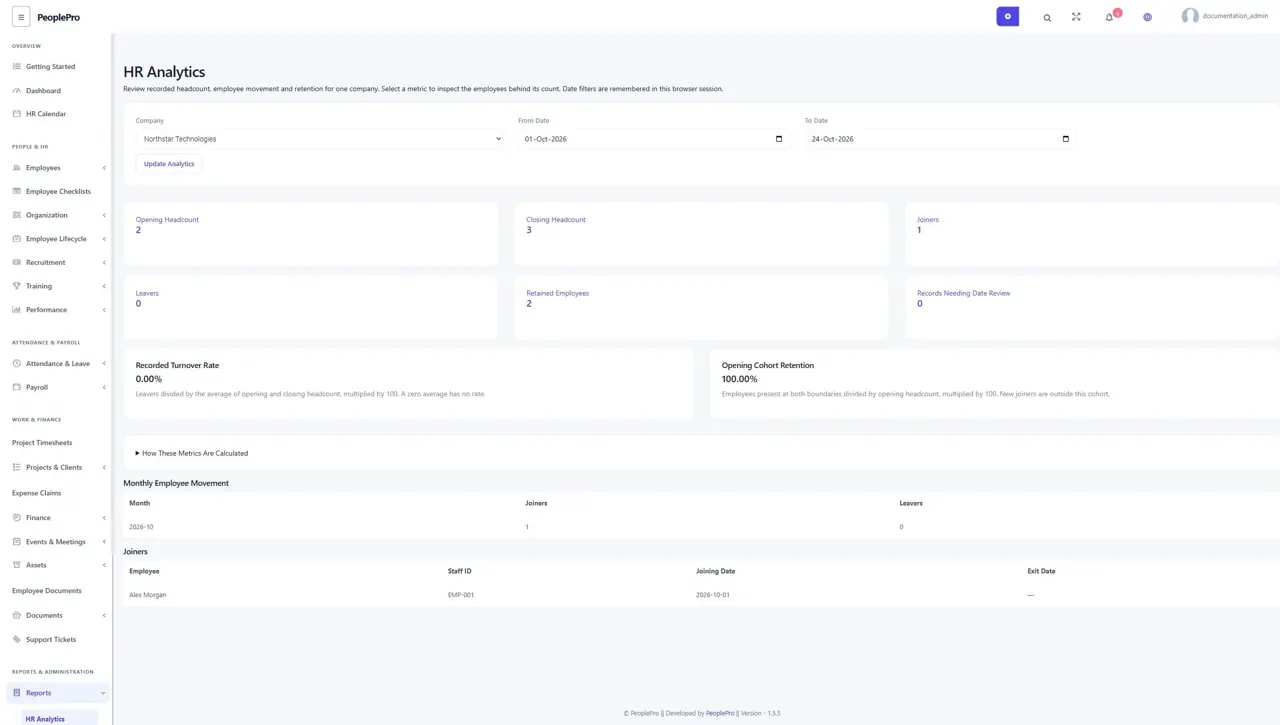
Open Reports > HR Analytics. Choose the company and an inclusive date range of up to 366 days ending no later than today. Update Analytics shows opening and closing headcount, joiners, leavers, retained employees and records needing date review. The selected filters are remembered in your current browser session.
Inspect the people behind a number
Select a metric card to see the employees behind that count. Check staff ID, joining date and exit date before drawing conclusions. The list follows your employee-report rights and company access. It does not expose salaries or private performance comments.
Interpret retention and turnover correctly
Recorded Turnover Rate divides leavers by the average opening/closing headcount. Opening Cohort Retention compares people present at both boundaries with opening headcount; new joiners are outside that cohort. A zero denominator has no rate. Expand How These Metrics Are Calculated for the exact date rules. Missing or unreliable employment dates need review before the report can represent your workforce accurately.