
Owned Goals and Measurable Key Results
Open Performance > Goal Tracking, then Goals and Key Results.
Last updated: 16 November 2026 · Product version: not specified in the supplied guide
Set a goal with an accountable owner
Open Performance > Goal Tracking, then Goals and Key Results. Authorized goal managers choose the company, employee owner, goal type, dates and description. An optional parent goal aligns the work with another goal in the same company. Add measurable results with a unit, baseline, target and weight. A decreasing target is useful for work such as reducing unresolved issues.
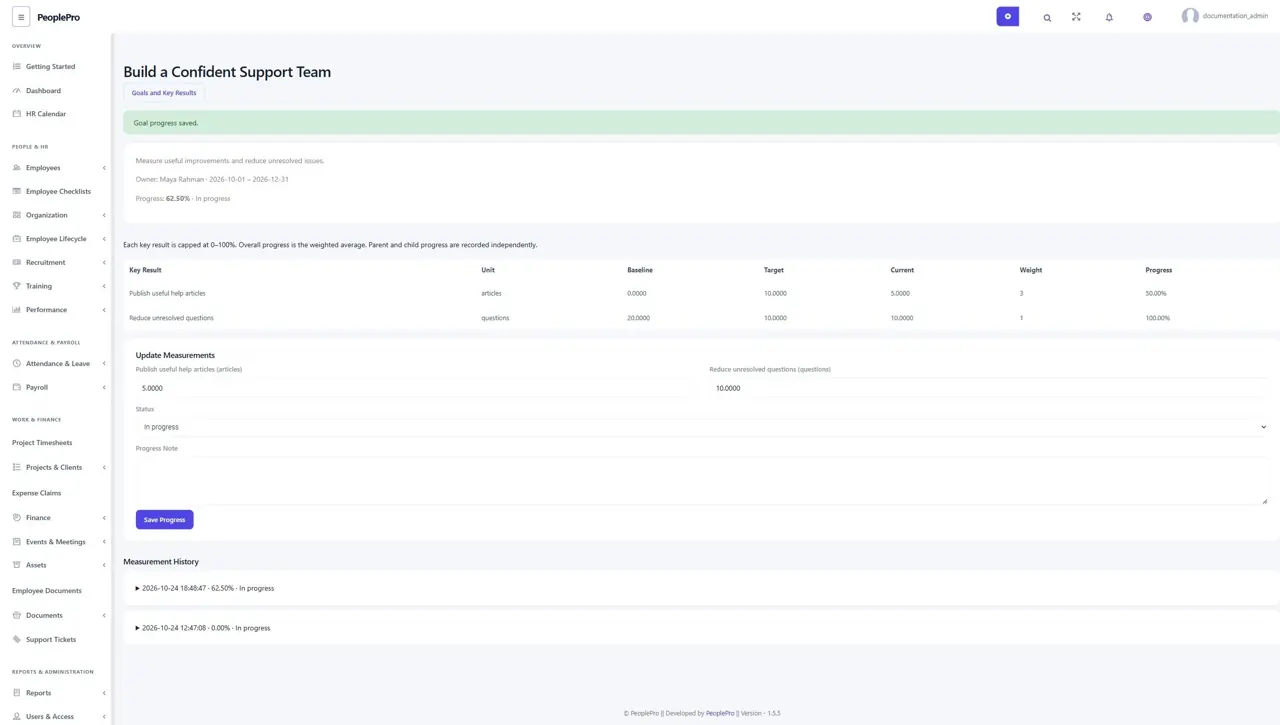
Update the actual measurements
The owner or authorized goal manager opens a goal, enters each current measurement and explains the progress. Save Progress records a new version with the measurements and note. A stale page must be reopened before saving. Baselines, targets and weights remain the original agreed terms rather than changing during progress updates.
Understand weighted progress and completion
Each result is limited to 0–100% progress; the overall percentage is its weighted average. A result with weight 3 contributes three times as much as one with weight 1. Every result must reach its target before the goal can be marked complete. Parent and child progress remain independent, so a child update does not invent progress for its parent.
Read history or cancel a goal
Measurement History retains the saved values, percentage, status and explanation. Cancel a goal with a reason when it should stop; its history remains read-only. Use the owned-goal workflow for these records because ordinary legacy goal edit/delete actions cannot erase their measurements or alignment history.