
Attendance Grace Policies
Open Attendance Requests, then Attendance Policies.
Last updated: 16 November 2026 · Product version: not specified in the supplied guide
Set a reporting tolerance for an employee
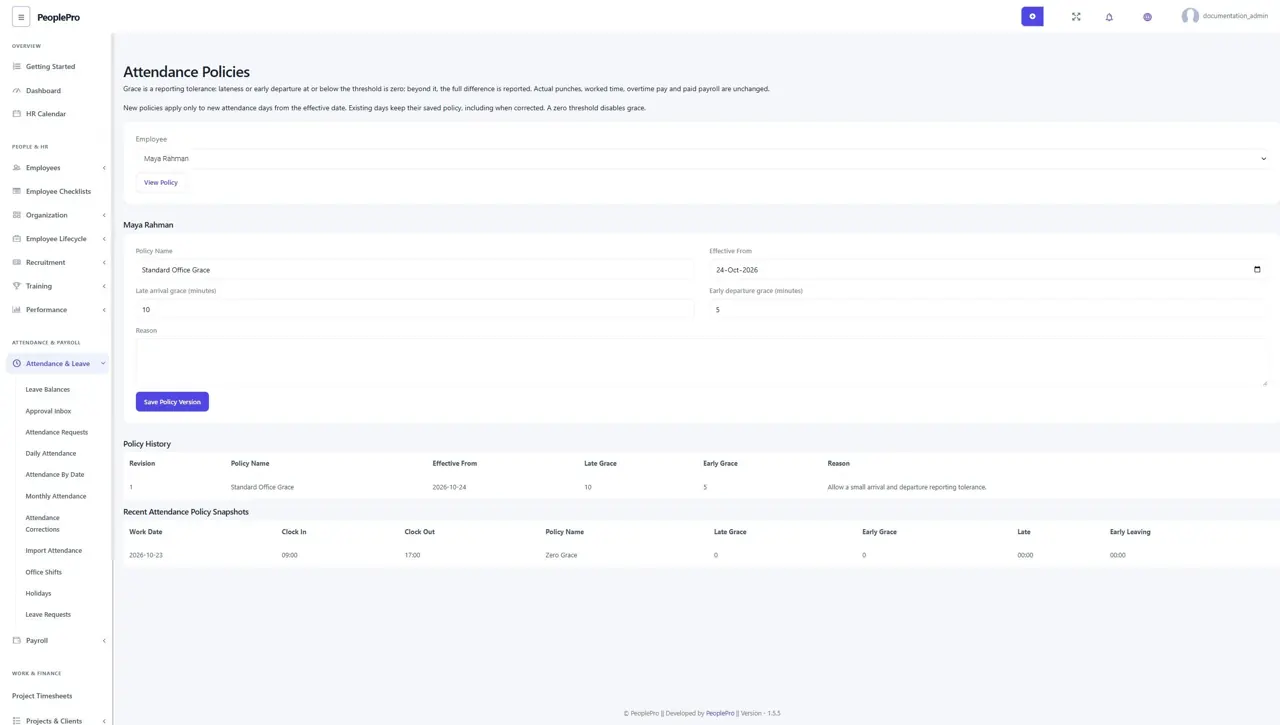
Open Attendance Requests, then Attendance Policies. Choose the employee, name the policy, select its effective date and enter late-arrival and early-departure grace in minutes. Enter a reason and save the policy version. Zero means no grace. Policies are optional and apply only to new attendance work dates from the effective date.
Understand the grace calculation
A difference at or below the threshold is reported as zero. If it exceeds the threshold, the full difference is reported. For example, a ten-minute late grace reports eight minutes as zero and twelve minutes as twelve. Grace does not change the original clock-in/out, worked hours, overtime payment or an already-paid payroll record.
Review saved attendance rules
An attendance day keeps its saved policy even when the employee policy changes later. Attendance corrections use that saved rule. Multiple intervals on the same work date share the first saved policy; returning after a recorded break does not add another first-arrival lateness. An older attendance day without a policy snapshot uses zero grace.