
Employee Loan Requests and Repayment History
Employees can open Loan Requests from My Work.
Last updated: 16 November 2026 · Product version: not specified in the supplied guide
Request an interest-free payroll repayment plan
Employees can open Loan Requests from My Work. Choose a loan type, enter the title, principal amount, number of monthly installments, first deduction month and a clear reason. Submit once and follow the saved request. Submission does not transfer money or create a salary deduction. The employee can cancel a pending request before HR decides.
Review a loan independently
Authorized HR can review requests from the employee company and approve or reject with an explanation. A person cannot approve their own request. Approval creates one payroll loan with the reviewed terms; arrange any cash disbursement separately through your normal process. Review current payroll activity first: a loan cannot be added behind an already-paid salary period. Resolve pending requests and repay an outstanding approved loan before moving the employee to another company.
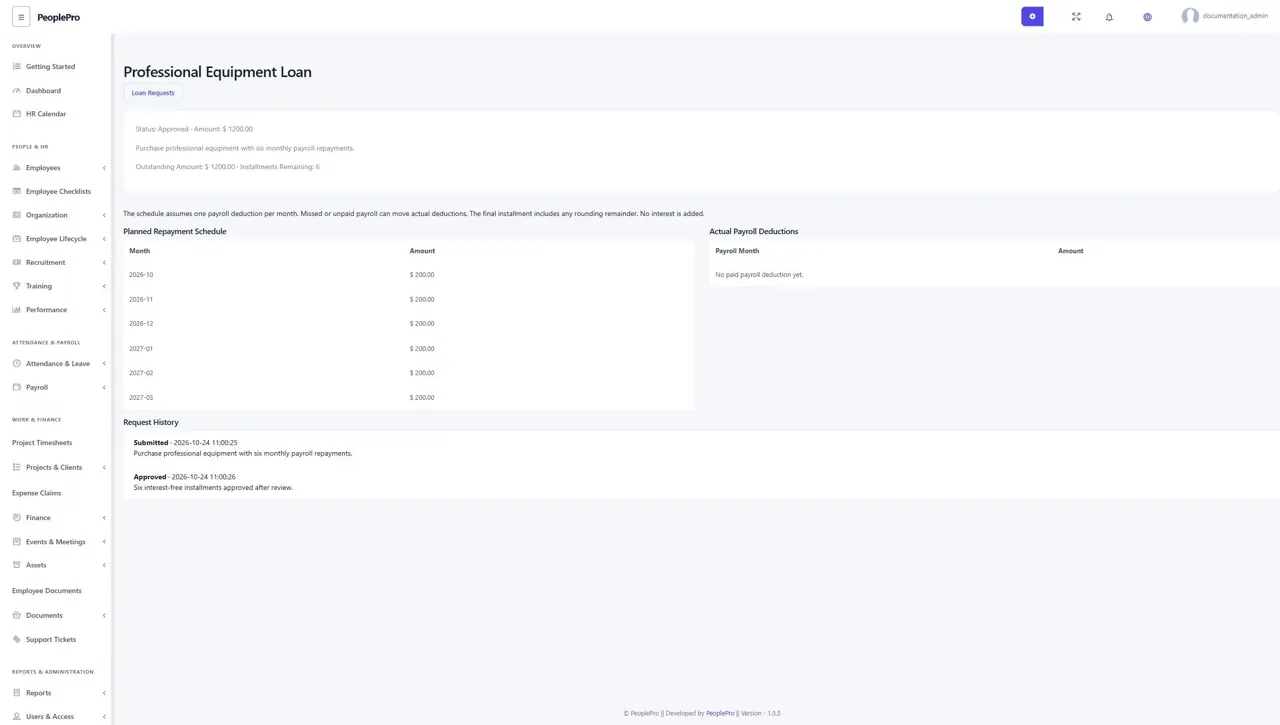
Read the planned and actual repayments
The loan details show principal, remaining installments and balance, planned monthly repayments and actual paid-payslip deductions. The plan assumes one paid payroll deduction per month; a missed or unpaid period can move the actual schedule. The final installment includes the rounding remainder. Approved request terms are retained rather than overwritten by ordinary salary-loan editing.